


Privacy Policy
Information Security Basic Policy
Derivative Creation Guidelines
Request to minors
©AoharuNEXT Inc.


FocusRay WiredModel OnlineManual
(AONXV-001-WR)
1.Introduction
Thank you for purchasing our product.
Please read this online manual carefully to ensure correct and safe use of the product.
Before using the product, please make sure to read 3. Safety Precautions.
2.Setup
Detailed and easy-to-understand instructions for setting up the product can be found in the Quick Start Guide on our support page. Please check the link below.
>Click here for the Quick Start Guide (https://www.aoharunext.co.jp/en/support/quickstart)
3.Safety Precautions
To ensure the safety of users and to prevent accidents such as fire or electric shock, please read this section carefully before use and strictly observe the instructions.
If you notice any abnormalities such as smoke, strange noises, or unusual odors, stop using the product immediately.
Disconnect the USB Type-C cable from the main unit, turn off the power switch, and confirm that smoke or other hazards are no longer present.
Continuing to use the product under such conditions may cause fire or malfunction.
Please request a repair through the Repair Information section on our support page.
Never attempt to repair the product by yourself
The following symbols indicate the nature of the precautions.

Prohibition

Instruction (Must be followed)

This content indicates a high risk of death or serious injury.
This product must be powered using the included power supply/communication USB cable and according to the method specified in the online manual. Supplying power by any other method may cause overheating or damage to the circuit board.
Do not use this product for any purpose other than its intended use. Doing so may cause equipment damage, accidents, or injury.
Do not use or charge this product in areas where it may be exposed to water. Using it in kitchens, laundries, or similar locations may cause electric shock.
Do not throw this product into fire, heat it, apply pressure to it, or charge, use, or leave it in high-temperature environments. Furthermore, do not heat it in a microwave oven or toaster oven. Doing so may cause overheating, fire, or rupture.

This content indicates a potential cause of personal accidents, including death or serious injury.
Do not perform any actions that could damage the power supply/communication USB cable or the USB Type-C connector. (Do not scratch, modify, place near heating appliances, forcefully bend, twist, pull, place heavy objects on, or bundle them, etc.) Using the USB cable or connector while damaged may cause a fire due to a short circuit.
Never disassemble or modify this product. Doing so may cause equipment malfunction, or metal objects may enter the device, resulting in burns or fire.
When connecting the power supply/communication USB cable to a personal computer, use a port that can output 2.0A or more via USB bus power. If the output is insufficient, the device may not receive sufficient power, or it may cause the personal computer to malfunction, overheat, or catch fire.
Do not allow foreign objects to enter the device, and do not splash or wet it with water or other liquids. Short circuits or overheating may cause fire, electric shock, or malfunction. Furthermore, do not place containers filled with water or other liquids, or metal objects, near the equipment. Please exercise particular caution regarding children.
Do not use damaged or deformed equipment. If the product becomes damaged or deformed, please request a repair.

This content indicates a risk of minor injury or property damage.
When securing the product to a VR headset, always use the included dedicated mounting bracket and ensure it is firmly attached. If it is not securely fixed, the equipment may fall, causing damage to the device or personal injury.
Do not use the product in locations with high levels of moisture, steam, oily smoke, or dust. Doing so may cause fire or electric shock.
Do not place this product within reach of infants or children. Doing so may cause unexpected accidents or injury.
Do not place the product in areas that reach abnormally high temperatures. In particular, the inside of a car or a car trunk can become extremely hot, reaching approximately 60 degrees Celsius (140 degrees Fahrenheit) or higher during midsummer. Never leave this product in such locations. Leaving it there may cause a fire.
When securing the product to a VR headset, do not overtighten the screws that connect the included dedicated mounting bracket to the product body. Overtightening may cause damage to the housing.
Usage Requests
・The use of this product assumes a position of 5 cm or more away from the body. Please use it at a distance of 5 cm or more from your body.
California Proposition 65 Warning: This product contains chemicals known to the State of California to cause cancer and birth defects or other reproductive harm.
・Do not bring the product into close contact with strong magnets (such as neodymium magnets). Doing so may damage the camera unit.
・If dirt or foreign matter gets on the camera lens, brush off the dust and debris with a soft cloth before wiping it clean. Do not use liquids such as alcohol.
・When disposing of the product, please follow the instructions of your local municipality. For Customers in the EU and UK: This symbol on the product or on its packaging means that your electrical and electronic equipment should be disposed of at the end of its life separately from your household waste. There are separate collection systems for recycling in the EU and UK.
4.Product Details / Package Contents
3-1.Package Contents
Product Name | Contents Description | Number of items |
|---|---|---|
FocusRay WiredModel(AONXV-001-WR) | FocusRay Wired Model Main Unit | 1 piece |
Dedicated Fixed Mount | Dedicated fixed mounts for each VR headset | 1 piece |
USB cable for power delivery and communication | USB Type-A to Type-C Cable | 1 piece |
Quick Start Guide, Safety Precautions and Warranty | Each explanatory document | One each |
3-2.Part Names
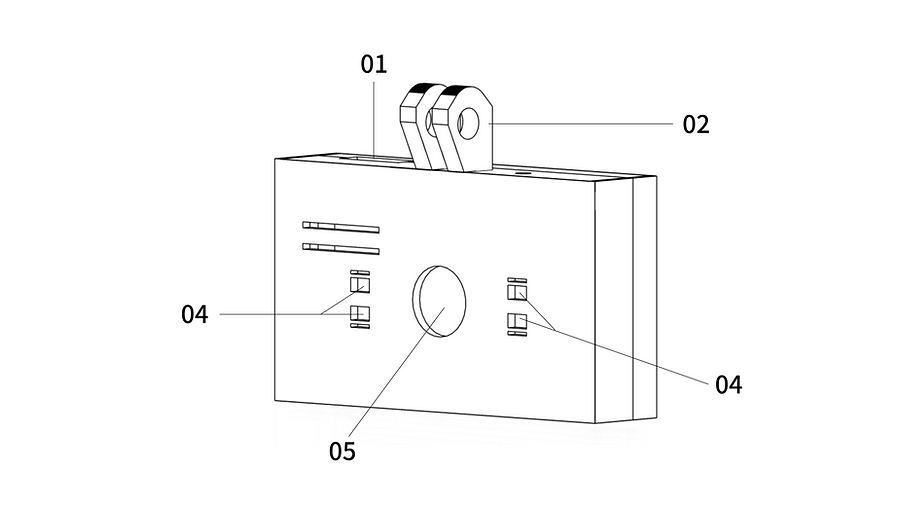
01: Charging / Communication Port
02: Bracket Mount Connection (Main Unit Side)
04: Infrared LED
05: Camera
5.Operation Method
5-1.Turning the Power On
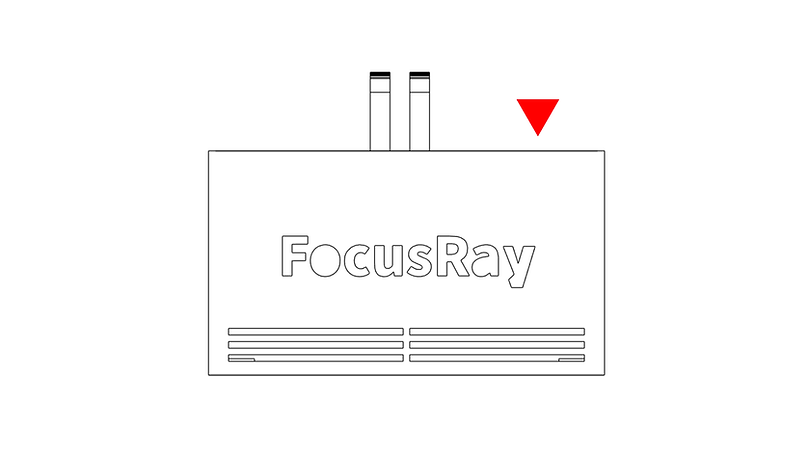
When looking from the camera lens side, connect the included USB cable to the USB Type-C connector located on the top of the main unit. If the device is recognized on your personal computer, it has started up normally.
(The four infrared LEDs around the camera lens emit invisible light, so they may appear to be turned off, but they are functioning normally. To check if they are working, capture the LED section using a smartphone camera or a similar device.)
5-3.Turning the Power Off
When looking from the camera lens side, disconnect the included USB cable from the USB Type-C connector located on the top of the main unit. If the device is disconnected from your personal computer, the power has been turned off normally.
6.Product Assembly
6-1.Attaching the Mounting Bracket to the Main Unit
Normally, the mounting bracket is already attached to the product when it arrives.
However, if you need to replace the mounting bracket or if it was not attached, please follow this procedure for installation.
Prepare the mounting bracket for your respective VR headset and the FocusRay main unit.

Secure the arm portion of the mounting bracket for your VR headset (the side with the three tabs protruding) to the main unit. Align the arm with the screw holes on the main unit so they interlock, and secure them using the included screws and nuts.
-
Please refer to "4-2. Part Names" for descriptions of each part.
At this time, to prevent damage to the housing, do not tighten the screws from both sides using a hex wrench or similar tool. Hold the nut in place with your hand and securely tighten from the other side using a Phillips screwdriver.
As a general guide for tightening, it is sufficient to tighten with a Phillips screwdriver an additional 1/4 turn after you feel resistance with your fingertips.
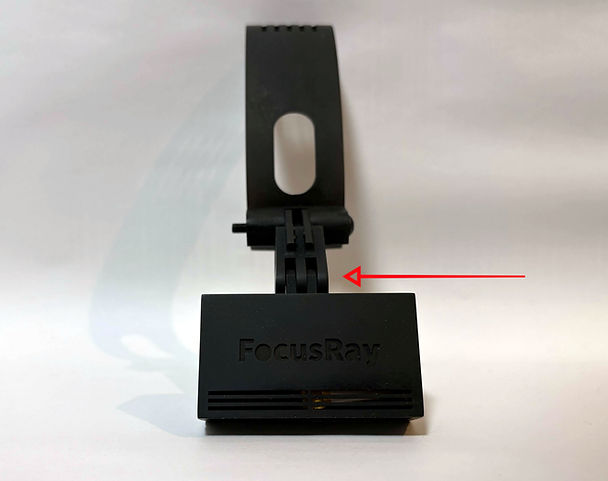
This completes the attachment of the main unit to the mounting bracket.
6-2.Attaching the Product to the VR Headset
This section explains how to secure the product to a VR headset using the dedicated mounting bracket.
Prepare the FocusRay main unit with the dedicated mounting bracket already attached.
All VR headset mounting brackets are designed to snap the top side in first, followed by the bottom side.
Hook the upper side of the clip portion (the part that catches onto the VR headset) onto the top of your VR headset.
Next, hook the lower side of the clip portion onto the bottom of your VR headset. If you hear a "click" sound at this point, it is successfully secured. To ensure safety during gameplay, please verify that it is firmly attached.
-
Do not apply excessive force, as doing so may damage the VR equipment or the FocusRay main unit.
6-3.Removing the Main Unit from the VR Headset
This section explains how to remove the FocusRay main unit from the VR headset.
All VR headset mounting brackets are designed to snap the top side in first, followed by the bottom side.
Gently pull the lower side of the clip portion (the part that catches onto the VR headset) downward and pull it slightly toward you to release the bottom latch.
Next, gently pull the upper side of the clip portion away from the top of your VR headset to remove it.
-
Do not apply excessive force, as doing so may damage the VR equipment or the FocusRay main unit.
6-4.Removing the Mounting Bracket from the Main Unit
This section explains how to remove the mounting bracket of each VR headset from the FocusRay main unit.

Detach the main unit from the arm portion of the VR headset mounting bracket (the opposite side of the clip portion that attaches to the VR headset).
Loosen the included screws and nuts that secure the interlocking arm and screw holes of the main unit using a flathead screwdriver or similar tool. If they are difficult to loosen, hold the nut portion in place with a hex wrench or similar tool and loosen the screw.
Once the screw is loosened to a certain extent, you will be able to remove the screw by hand.
-
Please refer to "4-2. Part Names" for descriptions of each part.
7.Legal Certification and Restrictions on Use
The use of this product is restricted to Japan, the United States of America, Australia, EU member states, the United Kingdom, Hong Kong, and Canada.


Certification and compliance information is printed on the label affixed to the side of the main unit.
8.Specifications
Product Name (Model Name) | FocusRay WiredModel(AONXV-001-WR) |
|---|---|
Communication standard | Wired connection via USB 2.0 |
Power supply method | Bus-powered via USB cable connection |
Weight | Body: 17.5g Body + Strap: 49.5g |
Unit Size | Width 60mm Height 34mm Depth 13mm |
Camera | 1280×720, max 120fps, Global Shutter |
Low-light support | Built-in infrared LED |
Supported Operating Systems | Windows10 / Windows11 |
9.Troubleshooting
Please check our support site and FAQ.
> FAQ is available here (https://www.aoharunext.co.jp/en/support/question)
The product warranty period is one year from the date of purchase, except for customers within the EU. Please refer to the "Warranty Terms" for details.
>Warranty terms can be found here (https://www.aoharunext.co.jp/en/support-global/manual-gl#warranty-repair-terms)
Please check here for information regarding repairs.
>Click here for repair information ( https://aoharunext.co.jp/support/manual#repair )
Company names, product names, and other designations mentioned in this manual may be registered trademarks or trademarks of their respective companies and belong to their respective rights holders. "FocusRay" and the FocusRay logo are pending trademarks of AoharuNEXT Inc.
©AoharuNEXT Inc.
